I’m currently seeing the below on Firefox for Android, and I can’t immediately see any settings I might’ve messed up. Is something wrong for everyone, or what’d I do? 

4 Likes
This was also reported in the “What’s New” thread. No idea what caused it or if a fix is coming. @wincenworks any ideas?
4 Likes
It does not look like that on my mobile, but we did indeed do an update last 24h. Maybe clearing cache helps, or toggling from and to dark mode again?
4 Likes
Same here..!
20 characters
1 Like
Latest round of update did a bunch of changes to how themes, colours, etc work and clearly they have been prioritizing integrating AI over making it coherent.
I’ll get around to tweaking them as I get the opportunity.
Edit: Checked and it appears there was some residual CSS for mobile that might have been doing it - hopefully that fixes it. If not, please let me know. I’ll go over stuff more thoroughly after work/on the weekend.
3 Likes

This is what it looks like for me right now on mobile, with dark mode. It was the same with light mode, but with black text instead
3 Likes
Well now even Dark mode is messed up.
I changed some of my personal preferences in the Settings and now it seems OK for me, but I don’t know if that will persist or not yet…
4 Likes
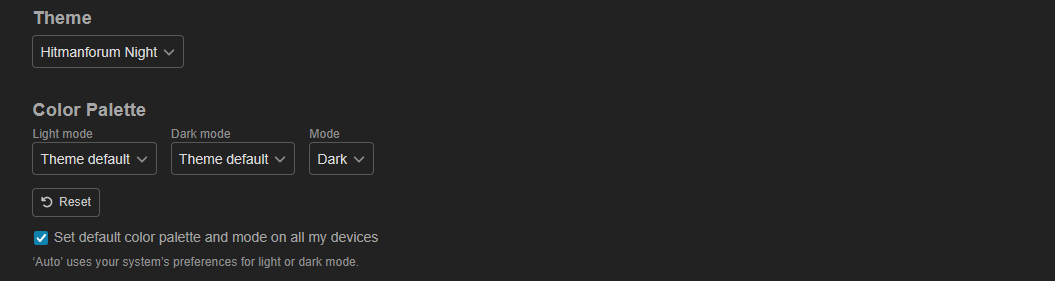
I managed to fix it by changing from “Theme Default” to “HMFNight” in the dark mode dropdown.
before:

after:

4 Likes
can confirm, this worked for me as well. I had the problem on Windows PC and iOS. Now resolved.
1 Like
Right now the forum’s absolutely unreadable, I got light grey text on a white background and trying to switch the theme to various dark things does nothing  I’ll just wait until it’s fixed then :x
(Using Firefox, AFAIK it’s up to date)

1 Like
Strangely, I have no issues at all.

I have these settings in Preferences > Interface. My browser is Chrome.

1 Like


Alright, seems the issue is they changed how the colours worked in stages - and this stage change means that effectively having Dark/Light mode for each variant will require a complete re-design and moving all colour information out of CSS.
For now it’s back to Night is for dark mode, and default for Day… I will look into if I can make them work with the strange mix of interfaces and manual overrides provided.
3 Likes
Best admin ever! Thanks!
1 Like
Good thing you probably didn’t have anything else to do today!
Sorry this happened and thanks for handling.
1 Like